Use this GPA Calculator to figure out your GPA and create a detailed GPA report. Got percentage grades, a unique grading scale, or high school classes like AP or IB? No problem, just head to “Settings” to enter your custom values. You can also use Settings to organize courses by semester or factor in your previous GPA.
The calculator can be used to determine the minimum GPA required in future courses to raise GPA to a desired level or maintain the GPA above a certain level.
What Is a GPA Calculator?
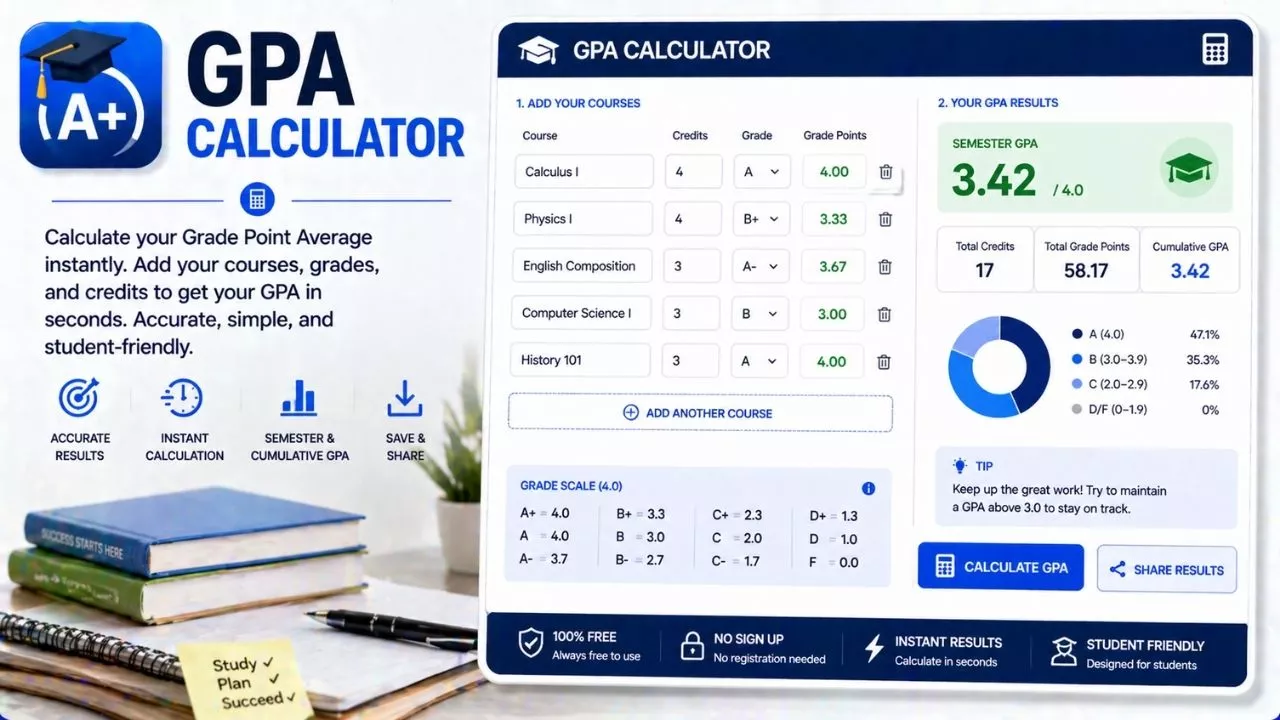
A GPA calculator is a simple tool that helps students figure out their Grade Point Average, also called GPA. Your GPA is a number that shows how well you are doing in school based on your grades. Schools in the United States usually use a scale from 0.0 to 4.0, where 4.0 means excellent performance.
Each letter grade you earn in class is given a number value. For example, an A is usually worth 4 points, a B is worth 3 points, a C is worth 2 points, and so on. A GPA calculator takes all those values and averages them to give you one final score.
Instead of doing the math by hand, which can get confusing, the calculator does it for you in seconds. You just enter your grades and sometimes the number of credits or class weight, and it gives you your GPA.
Students use GPA calculators for many reasons. Some want to check how they are doing in the current semester. Others want to see what grades they need to reach a certain GPA. It is also useful for planning future goals, like getting into a good college or qualifying for scholarships.
Understanding how GPA works is important because it is often used by schools, colleges, and even employers to measure academic performance. A GPA calculator makes that process easy and less stressful.
How GPA Is Calculated
To understand a GPA calculator, it helps to know how GPA is actually calculated. The process is based on converting letter grades into numbers and then finding the average.
First, each grade is assigned a point value. A common system looks like this:
- A equals 4.0
- B equals 3.0
- C equals 2.0
- D equals 1.0
- F equals 0.0
Some schools also use plus and minus grades. For example, a B+ might be 3.3, and an A- might be 3.7. These small differences can affect your overall GPA.
Next, each class may have a certain number of credits. A class that meets more often or covers more material may have more credits. To calculate GPA, you multiply the grade points by the number of credits for each class.
After that, you add up all the grade points you earned. Then you divide that total by the total number of credits.
For example, imagine you took three classes:
- Math: A (4.0) with 3 credits
- Science: B (3.0) with 3 credits
- English: A (4.0) with 4 credits
You would multiply and add like this:
- Math: 4.0 × 3 = 12
- Science: 3.0 × 3 = 9
- English: 4.0 × 4 = 16
Total points = 37
Total credits = 10
GPA = 37 ÷ 10 = 3.7
A GPA calculator handles all these steps automatically, saving time and avoiding mistakes.
Types of GPA Calculators
There are different types of GPA calculators, each designed for a specific purpose. Choosing the right one depends on what you need to calculate.
One common type is the simple GPA calculator. This one is best for quick calculations when all your classes have the same weight. You just enter your grades, and it gives you an average.
Another type is the weighted GPA calculator. Some schools give extra points for advanced classes like Honors or AP courses. For example, an A in an AP class might be worth 5.0 instead of 4.0. A weighted calculator takes this into account and gives a more accurate result for students taking challenging courses.
There is also the cumulative GPA calculator. This one is useful if you want to know your overall GPA across multiple semesters or school years. It combines past GPA scores with your current grades.
Some calculators are designed for planning. These let you enter expected grades to see how they will affect your GPA. This can help you set goals and understand what you need to improve.
Online GPA calculators are widely available and easy to use. Many are free and only require basic information. Some even include features like saving your results or showing charts.
Using the right type of calculator ensures that your GPA is accurate and meaningful.
Why GPA Matters in the United States
In the United States, GPA plays an important role in a student’s academic journey. It is one of the main ways schools measure performance over time.
Colleges often look at GPA when reviewing applications. A higher GPA can increase your chances of getting accepted into competitive programs. It shows that you have been consistent in your studies and can handle academic challenges.
GPA is also important for scholarships. Many scholarships require a minimum GPA, and some offer better rewards for higher GPAs. This means your grades can directly affect your financial opportunities.
In high school, GPA can determine class rank. Students with higher GPAs may be ranked at the top of their class, which can lead to special recognition like valedictorian or honors awards.
Some schools use GPA to decide eligibility for extracurricular activities. For example, you may need to maintain a certain GPA to participate in sports or clubs.
Even after school, GPA can matter. Some employers look at GPA when hiring recent graduates, especially for entry-level positions. It gives them an idea of your work ethic and dedication.
Because GPA has such a wide impact, keeping track of it with a GPA calculator is a smart and helpful habit.
How to Use a GPA Calculator Step by Step
Using a GPA calculator is simple, even if you are not comfortable with math. Most calculators follow the same basic steps.
First, gather your grades for each class. You will need the letter grades or percentage scores, depending on what your school provides.
Next, find out how many credits each class is worth. This information is usually available on your schedule or report card.
Then, enter your grades into the calculator. Many tools allow you to select your grade from a dropdown menu, which makes it easy.
After that, enter the number of credits for each class. If your classes all have the same credit value, some calculators will let you skip this step.
If your school uses weighted grades, make sure to select the correct option for honors or advanced classes. This ensures your GPA is calculated correctly.
Once all the information is entered, click the calculate button. The tool will instantly show your GPA.
For example, if you enter four classes with grades A, B, A, and C, along with their credits, the calculator will quickly give you the average without needing manual math.
Using a GPA calculator regularly can help you stay aware of your progress and avoid surprises at the end of the term.
Tips to Improve Your GPA
Improving your GPA takes time and effort, but small changes can make a big difference. The key is to stay consistent and focused.
Start by organizing your schedule. Keep track of assignments, tests, and deadlines so you do not miss important work. Using a planner or a digital calendar can help.
Pay attention in class and take good notes. This makes studying easier later and helps you understand the material better.
If you are struggling in a subject, ask for help early. Teachers, tutors, and classmates can explain things in a different way that may make more sense.
Practice regularly, especially for subjects like math and science. The more you practice, the more confident you will become.
Try to complete assignments on time and put in your best effort. Even small assignments can affect your GPA over time.
Another helpful tip is to review your mistakes. Understanding what went wrong helps you avoid repeating the same errors.
Set realistic goals for improvement. For example, aim to raise a C to a B before trying to reach an A. Gradual progress is more sustainable.
Using a GPA calculator can motivate you by showing how your efforts improve your overall score. Seeing progress can encourage you to keep going.
Common Mistakes to Avoid
While using a GPA calculator is straightforward, there are some common mistakes that can lead to incorrect results.
One mistake is entering the wrong grade values. For example, confusing a B+ with a B can slightly change your GPA. Always double-check your entries.
Another common issue is ignoring class credits. If one class has more credits than another, it should have a greater impact on your GPA. Forgetting this can lead to inaccurate calculations.
Some students forget to include all their classes. Leaving out even one class can change the final result.
Using the wrong type of calculator is another problem. If your school uses weighted grades and you use an unweighted calculator, your GPA may appear lower than it actually is.
It is also important to update your GPA regularly. Waiting until the end of the semester can make it harder to track your progress and adjust your study habits.
Another mistake is relying only on GPA without understanding the underlying grades. GPA is helpful, but knowing your strengths and weaknesses in each subject is just as important.
Avoiding these mistakes ensures that your GPA calculations are accurate and useful.
Final Thoughts
A GPA calculator is more than just a tool for numbers. It helps you understand your academic performance and plan for the future.
By using it regularly, you can stay aware of where you stand and make better decisions about your studies. It also helps reduce stress because you do not have to guess your GPA or do complicated calculations on your own.
Whether you are aiming for college admission, scholarships, or personal improvement, knowing your GPA is an important step. A calculator makes that process simple, fast, and reliable.
Think of it as a guide that shows how your daily efforts add up over time. Every assignment, test, and class contributes to your overall performance.
With the right approach and consistent effort, you can use a GPA calculator to stay on track and reach your academic goals.